

-
[게임엔진활용] 10강 파티클 시스템[DSU] 게임엔진활용 2026. 6. 8. 01:16728x90
파티클 시스템 제작
브랜딩 방식 변경 Src : SrcAlpha Dst : One
 123456789101112131415161718192021222324252627282930313233343536373839404142434445464748495051525354555657585960616263646566676869707172737475767778798081828384858687888990919293949596979899100101102103104105106107108109110111112113114115116117118119120121122123124125126127128129130131132133134135136137using System;using UnityEngine;public class GamePS : RenderView{Texture texPS;Vector2 position;float degree;class PS{public PS(){life = 0f;}public float life, _life;public Vector2 p, v;public Color cs, ce;public float ss, se;}PS[] _ps;// 활성화 + 비활성화 가리지 모든 입자PS[] ps;// 활성화 입자int psNum;float psDelta;public override void load(){materialIndex = 5;Texture2D tex = new Texture2D(32, 32);for (int i = 0; i < 32; i++){for (int j = 0; j < 32; j++){float d = (float)Math.Sqrt((16 - i) * (16 - i) + (16 - j) * (16 - j)) / 16;if (d > 1)d = 1;float a = 1 - d;//a *= a;a = (float)Math.Sin(a * 90 * Math.PI / 180);tex.SetPixel(i, j, new Color(1, 1, 1, a));}}tex.Apply();texPS = tex;_ps = new PS[200];for (int i = 0; i < 200; i++)_ps[i] = new PS();ps = new PS[200];psNum = 0;}public override void free(){}public override void draw(float dt){setRGBA(0, 0, 0, 0.7f);fillRect(0, 0, mc.devWidth, mc.devHeight);setRGBA(1, 1, 1, 1);materialIndex = 5;//drawImage(texPS, 300, 0, 0, 0, texPS.width, texPS.height, TOP | LEFT, 10, 10);for (int i = 0; i < psNum; i++){PS p = ps[i];float r = p.life / p._life;p.p += p.v * dt;Color c = p.cs * (1 - r) + p.ce * r;float s = p.ss * (1 - r) + p.se * r;setRGBA(c.r, c.g, c.b, c.a);drawImage(texPS, p.p.x, p.p.y,0, 0, texPS.width, texPS.height, TOP | LEFT, s, s);p.life += dt;if (p.life > p._life){p.life = 0;psNum--;ps[i] = ps[psNum];i--;}}setRGBA(1, 1, 1, 1);psDelta += dt;while (psDelta > 0.015f){psDelta -= 0.015f;createPS((int)position.x, (int)position.y);}materialIndex = 0;}void createPS(int x, int y){PS p = null;for (int i = 0; i < _ps.Length; i++){p = _ps[i];if (p.life == 0)break;}if (p == null)return;p._life = 0.5f + 0.5f * (getRandom() % 100) / 99; //0.5 ~1.0fp.life = 0.000001f;p.p = new Vector2((int)(x - 30 + 60f * (getRandom() % 100) / 99),(int)(y - 30 + 60f * (getRandom() % 100) / 99));p.v = new Vector2(-30 + 60 * (getRandom() % 100) / 99, -160);p.cs = new Color(1, 0, 0, 1);p.ce = new Color(1, 1, 0, 0.5f * (getRandom() % 100) / 99);p.ss = 2 + 1.0f * (getRandom() % 100) / 99;// 2~3p.se = 0.1f + 0.4f * (getRandom() % 100) / 99;// 0.1~0.5ps[psNum] = p;psNum++;}Vector2 prevPosition;public override void mouse(int state, float x, float y){if (state == 0){prevPosition = position;position = new Vector2(x, y);degree = (float)Math.Atan2(prevPosition.y - position.y, prevPosition.x - position.x);}}}
cs 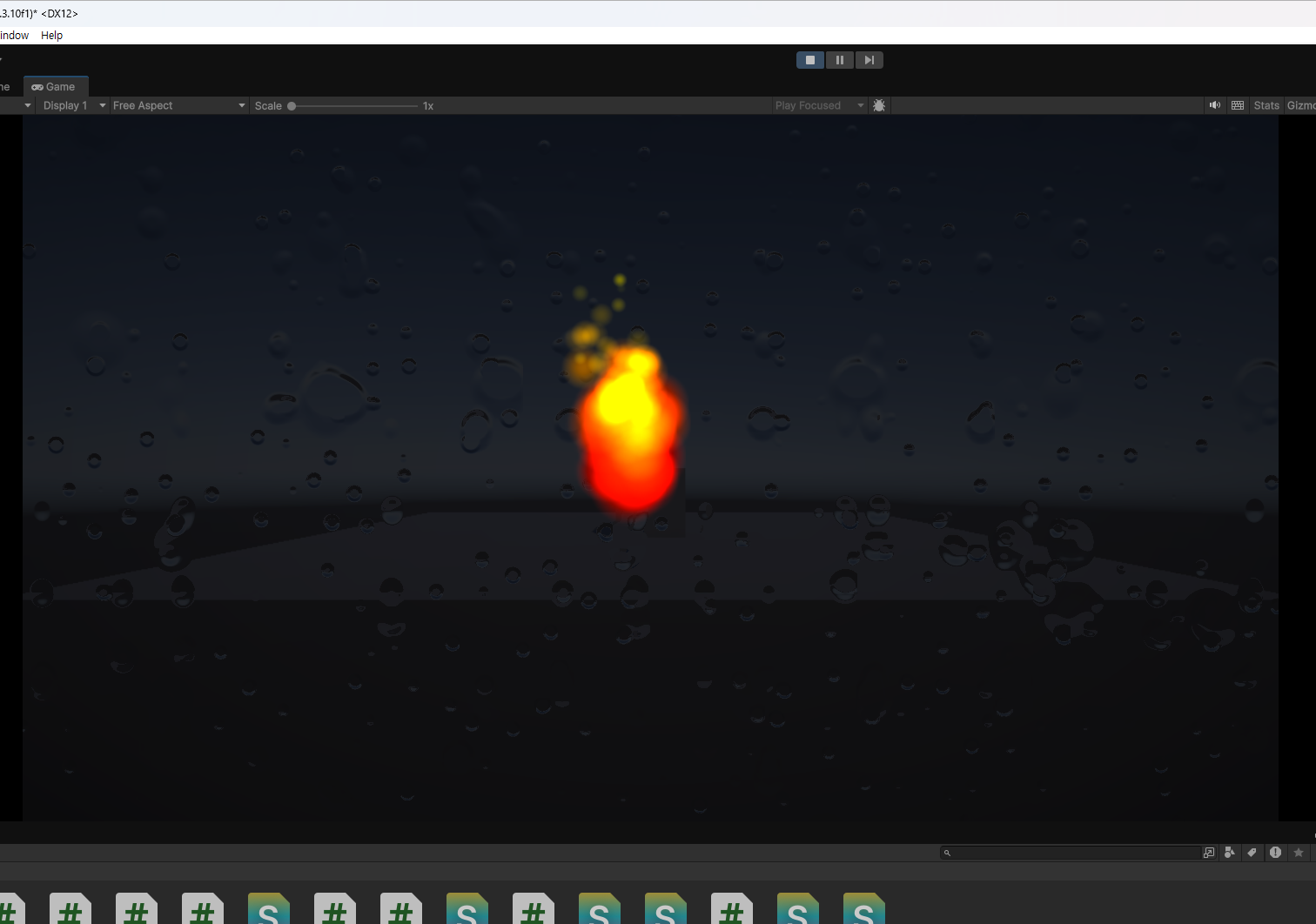
'[DSU] 게임엔진활용' 카테고리의 다른 글
[게임엔진활용] 12강 콤보시스템 (0) 2026.06.08 [게임엔진활용] 11강 피하기 게임 제작 (0) 2026.06.08 [게임엔진활용] 9강 플랫포머 게임 제작 (0) 2026.06.08 [게임엔진활용] 8강 사과 게임 제작 (0) 2026.06.08 [게임엔진활용] 7강 게임 시스템 구성 (0) 2026.06.08